Free VMware vSphere Tools
While looking for a backup solution for my VMware environment, I stumbled upon a very nice article by Kendrick Coleman on his blog on a top 10 list of carefully selected tools for managing your VMware vSphere deployments, and the best thing is that they are all free!!
Kendrick had also done video demos for these tools so you can pick the best without installing it.
Here is the link: Top 10 Free VMware vSphere Tools and Utilities for 2011
Nicely done Kenny!
Cheers.
/via kendrickcoleman.com
Yet Another Technology Quote
“Love is in the cloud.” – Sohail Iqbal (10 Jan 2011)
Another Technology Quote
"If user is the King, then usability is the Queen." – Sohail Iqbal
Data Visualization with Microsoft Live Labs Pivot
UPDATE: According to Microsoft, the product is graduated to become a Silverlight web control, and is available at Silverlight PivotViewer. The website initially hosting Pivot at getpivot.com is no more active. Links blow are updated accordingly.
Yet another beautiful piece of software form MS Live Labs: Pivot, a fun way of exploring and visualizing data. Here’s what MS says about Pivot:
“Pivot makes it easier to interact with massive amounts of data in ways that are powerful, informative, and fun. We tried to step back and design an interaction model that accommodates the complexity and scale of information rather than the traditional structure of the Web.”
It is so simple and intuitive that “Even an MBA can use it”
. And as you may have guessed, its XML driven and as a developer, you can bring your corporate data into it in minutes. All you need to do is publish you images according to Pivot guidelines and write a Data Transformation script out of your DB Engine and you are ready to rock n’ roll.
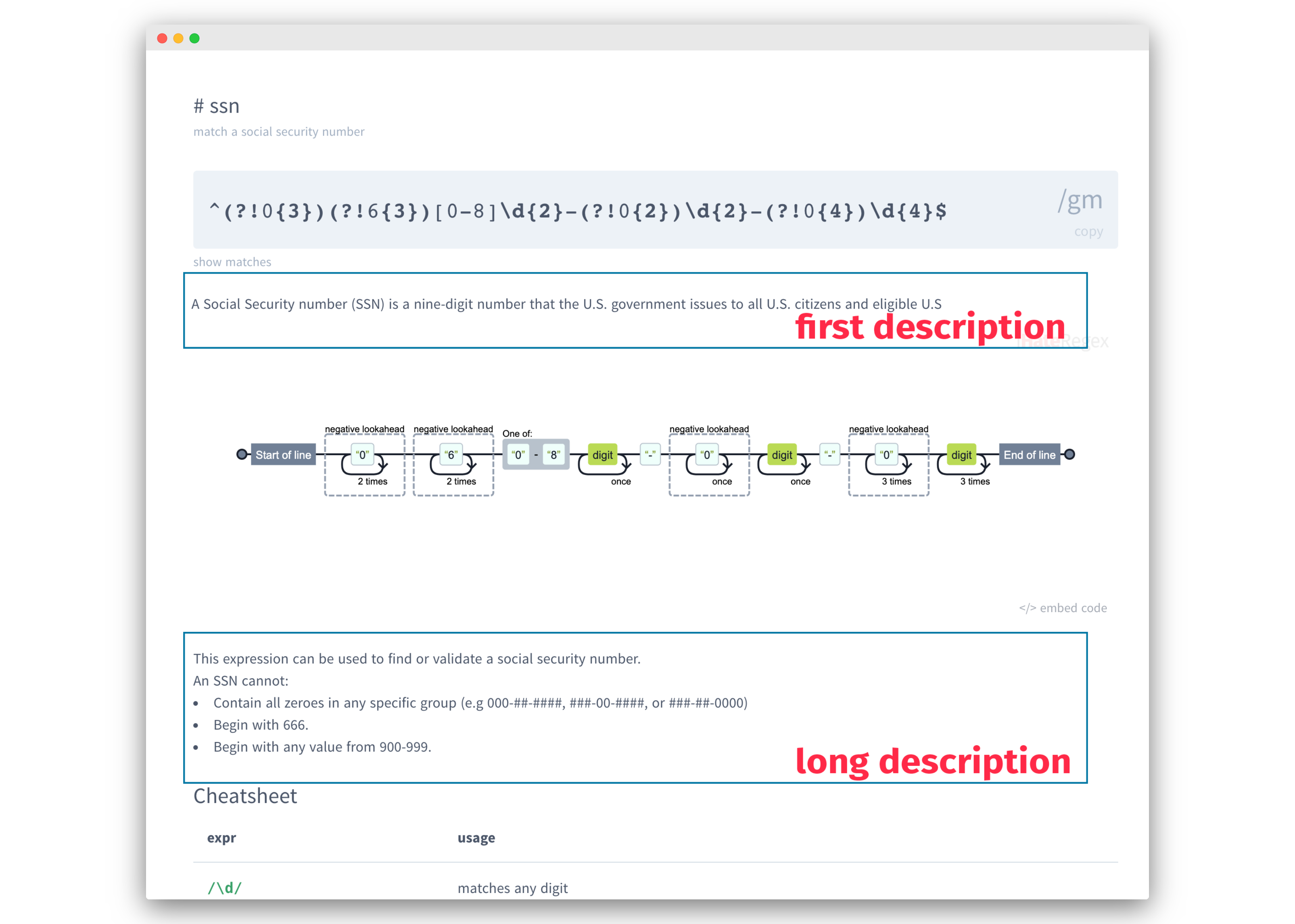
The dedicated site for Pivot getpivot.com has a comprehensive guide on how to model data collections for use with Pivot Client. Below is the diagram of XML schema which is consumed by the Pivot:

As i said, the UI is highly intuitive, just slice and dice through the data set and narrow down to what are you looking for. It keeps adding filters to data as you select through, and you can easily modify there filters as needed. There are some public collections available on their site for everyone to quickly get going.
Here a live example of how in just a few clicks I learned that our beloved Snow Leopard is one of the most endangered species in Pakistan:

I loved it and hope you too will enjoy it. I think Pivot is a great tool to present data to Information Workers as well as to the management for reporting and decision support.
Download here are give it a try: http://getpivot.com/download/ [Update: Silverlight PivotViewer]
// ch3ckmat3
Enterprise 2.0 Overview
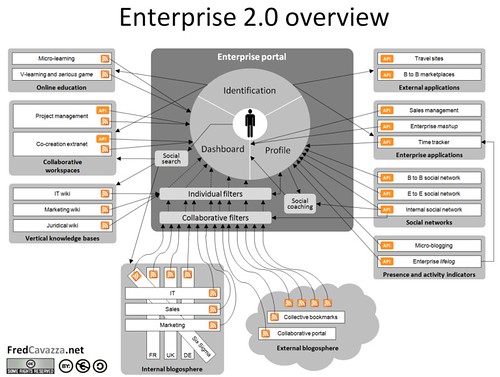
Enterprise 2.0 overview, originally uploaded by fredcavazza.
Found an excellent article on Enterprise 2.0 Concepts, including a great visual summarizing it up. A good read for management perspective.
// ch3ckmat3
A Technology Quote
“The world doesn’t need another computer language. What is really needed right now, is a cross-compiler.” – Sohail Iqbal (21 October 2009)
// ch3ckmat3
Deploying Network Services behind Corporate Firewalls: Net.TCP Port Sharing in WCF
Just found a good feature of WCF, which seems quiet useful for distributed application developing/deployment practices. Through Net.TCP Port Sharing Service, Windows Communication Foundation (WCF) allows different processes to share the same TCP Ports. Now you can deploy your .Net based network services side-by-side with IIS on port 80 or 8080, the standard HTTP and HTTP Proxy ports you find open in many firewalls by default. No need to mess around with client’s network department on this one.
Read on at MSDN: Net.TCP Port Sharing, and don’t forget to read the related articles on enabling and configuring the Port Sharing Service.
//ch3ckmat3
Vote for Silverlight 4.0 Features
I just added a feature “Bundle the run-time with apps for mobile (WinMo/Symbian/IPhone/Android)” to Silverlight 4.0 Feature Discussion Group. Cast your vote here http://silverlight.uservoice.com/pages/4325-feature-suggestions.
Cheers
// ch3ckmat3
A Quote
uTorrent for Mobile
Wait a minute… you think you can leech some bits of torrents from every public hotspot that comes your way? No sir, that’s not the case (at least for now). This neat piece of software is not a torrent client, it actually lets you control the uTorrent from your mobile, ideally on Wi-Fi in home or office, where you have uTorrent running with WebUI installed.
I just happen to setup WebUI for myself and had this wild idea to get the remote control on my mobile, and guess what, “Your best idea is already copyrighted.” proves true again!
These guys here have done a great job actually. The uTorrent Remote Control is done in J2ME, with a simple interface, lets you control and monitor torrent activity on your uTorrent application.
I also found some other useful bits here on the same site, but I’m in love with this torrent thingy I tell you that. Go try it for yourself!
Cheers,
// ch3ckmat3